
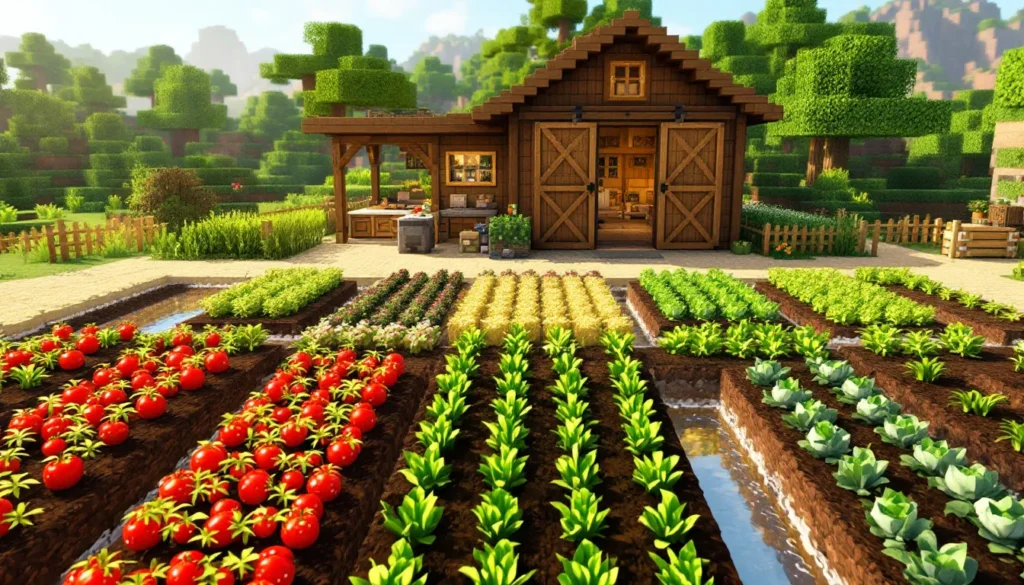
If you’ve ever felt like vanilla Minecraft farming was a bit… bland, you’re not alone. Sure, you can plant wheat, wait for it to grow, and call it a day. But what if farming could actually feel rewarding? What if you could run a full-scale farmstead with cooking stations, fresh crops, and decorative elements that make your setup look less like a production facility and more like an actual living space? That’s where the Farmer’s Delight mod comes in. This mod transforms Minecraft’s farming mechanics into something genuinely engaging, adding dozens of crops, cooking recipes, and farm-themed building blocks that pull the game’s survival mode into something closer to a cozy farming sim. Whether you’re on PC with Forge or Fabric, or playing on a server, Farmer’s Delight has become a staple in modded Minecraft for a reason. Let’s break down what makes it special and how to get the most out of it.
Key Takeaways
- Farmer’s Delight Minecraft mod transforms vanilla farming into an engaging experience with over 20 new crops, specialized cooking stations, and decorative farmstead blocks that create functional, aesthetically pleasing farms.
- The mod’s cooking system goes beyond simple crafting by requiring ingredient preparation at cutting boards, cooking at stoves, and progression through a Farming Table, making food preparation feel like meaningful progression.
- Compatible with both Forge and Fabric loaders (Minecraft 1.18–1.21), Farmer’s Delight integrates seamlessly with other popular mods and requires minimal performance overhead while enriching survival gameplay.
- Crops in Farmer’s Delight grow based on optimal lighting, water hydration, and soil conditions, with seasonal varieties and scarecrow mechanics that prevent decay and encourage thoughtful farm design rather than mindless planting.
- The mod works equally well as a standalone addition or within larger modpacks, rewarding both casual players who enjoy cozy farming and experienced builders who optimize yields through layout planning and cross-mod integration.
- Common setup issues like crops not growing typically stem from inadequate lighting or loader incompatibility, both easily resolved by verifying compatibility, using JEI for recipe guidance, and ensuring proper chunk loading for scarecrow mechanics.
What Is Farmer’s Delight and Why You Should Install It
Understanding the Mod’s Core Features
Farmer’s Delight isn’t just another crop mod that dumps a dozen new items into your inventory and calls it done. It’s a cohesive farming overhaul that respects Minecraft‘s aesthetic while expanding its depth. The mod adds over 20 new crops, including tomatoes, lettuce, onions, cabbages, and rice, each with distinct growth stages and harvest mechanics. But the real magic is in what you do after harvesting.
The cooking system is the centerpiece. Instead of smelting food in a furnace, you’ve got a full kitchen setup with cutting boards, stoves, basins, and more specialized stations. Actual recipes require actual ingredients and steps. Making a stuffed pumpkin isn’t just combining items in a crafting table: it demands preparation. This feels like progression in a way vanilla cooking never does. You’re not just feeding your character: you’re actually preparing meals.
Beyond crops and cooking, Farmer’s Delight includes farmstead blocks, hay blocks, wooden frames, barn doors, and decorative fencing, that make your farm actually look like a farm instead of a grid of tilled dirt. The mod also adds features like scarecrows (functional decoration that prevents crops from decay), rice paddies with proper water mechanics, and even little conveniences like rope that prevents fall damage.
For players who’ve been in the modded Minecraft scene, this is a quality-of-life expansion that feels essential rather than gimmicky. It respects the vanilla feel while scratching that “I want more depth” itch.
Compatibility and Installation Requirements
Farmer’s Delight works on both Forge and Fabric loaders, though the Fabric version is the primary maintained build as of 2026. You’ll find it on Nexus Mods and CurseForge, both hosting the same core mod. Installation is straightforward: download the .jar file, drop it into your mods folder (make sure Minecraft Forge or Fabric is installed first), and launch.
Version compatibility matters here. Farmer’s Delight supports Minecraft 1.18 through 1.21 as of early 2026, though some older versions have their own legacy builds. If you’re running a server, the mod requires it on both client and server, it won’t work if only one side has it installed. For multiplayer, this is non-negotiable.
Dependencies are minimal. The mod requires only Forge/Fabric and a basic library (Neoforge or Fabric API depending on your loader). It plays nicely with other popular mods like JEI, Waila, and even more ambitious overhauls like Immersive Engineering or Create. Performance-wise, it’s light: you won’t see a noticeable FPS hit on any system that runs vanilla Minecraft comfortably. No special system requirements beyond that.
Setting Up Your Farm: Getting Started with Farming Blocks and Tools
Essential Farming Blocks and Structures
When you first install Farmer’s Delight, you’ll unlock a whole new section of the creative inventory dedicated to farming infrastructure. The Rich Soil block is the foundation, it’s like farmland, but it doesn’t revert to dirt when you walk on it or when water flows over it. This is huge for aesthetics because you can finally build a farm that looks intentional rather than accident-prone.
You’ll also get access to Hay Blocks in variants, these are purely decorative but essential for making your farm feel cohesive. Pair them with the new Wooden Frames and Barn Doors to create storage structures that actually look like barns. The Scarecrow is functional: place one in a farm area and crops nearby won’t decay during rain, plus they just look right.
For water management, Rice Paddies are game-changers. Unlike regular farmland, rice paddies require standing water and specific soil conditions. They’re not harder to manage once you understand the mechanic, but they force you to think about farm layout. You can’t just plop a water source and call it done: you need design intentionality.
The Cutting Board is your first workstation. It’s where you’ll prepare ingredients before cooking. Unlike a crafting table, it’s a physical block that sits in your world and has a small inventory UI. This separation of concerns, prep work happens at the cutting board, actual cooking at the stove, creates a real workflow.
Planting and Growing Crops Effectively
Planting in Farmer’s Delight follows vanilla rules mostly. You need hydrated farmland (or Rich Soil for better stability), and crops go through growth stages. But the crop variety changes the game. Tomatoes are straightforward, they grow like wheat. Cabbages are slightly slower but grow in clusters that you can harvest multiple times if you’re careful. Rice requires those rice paddies and a specific setup, but yields more per harvest.
Seed drops are important here. When you harvest a crop, you get the crop item and seeds back (usually). This removes the RNG frustration of vanilla farming where you’d sometimes harvest wheat and get no seeds. That design choice alone makes farming feel less punishing.
Growth speed is tied to world time in-game, not real time. Crops grow faster when you’re actively in loaded chunks. If you leave your farm unloaded for hours, you’ll come back to fully grown crops, helpful for players who don’t want to wait. Bone meal speeds growth as expected, but here’s the thing: some Farmer’s Delight crops are picky about bone meal. Certain vegetables resist instant growth, forcing organic pacing if you want consistent harvests. This creates a nice balance between convenience and challenge.
Farmer’s Delight also introduces the concept of crop seasons. Some crops only grow during specific times or conditions. This adds another layer to planning your farm layout. You might dedicate sections to spring crops, summer crops, and so on, creating actual seasonal variety. It sounds complex, but the JEI integration (if you install it) makes it immediately clear which crops grow when.
Mastering the Cooking System and Kitchen Equipment
Kitchen Furniture and Cooking Stations
The cooking system is what separates Farmer’s Delight from simple crop-adding mods. The Stove is your primary cooking device. Unlike the furnace, it has a specific purpose: recipes exclusive to Farmer’s Delight. You can’t cook fish there or smelt ore: you’re strictly making food. This thematic separation matters. It creates a sense that you have a dedicated kitchen, not a multipurpose oven.
The Cutting Board is where prep happens. Place raw ingredients like tomatoes, onions, or cabbages on it and right-click them with a knife to create cut versions. Some recipes require cut ingredients specifically, you can’t just throw a whole tomato into a recipe. This enforces a workflow: harvest, go to cutting board, prepare ingredients, then cook.
Other stations include the Basket, which functions as portable storage, the Milk Churn for dairy processing, and the Cooking Pot for bulk recipes like soups and stews. Each station has a visual footprint and feels integrated into your world rather than being a floating UI element.
The Farming Table is special, it’s a research/crafting hybrid where you unlock certain advanced recipes by spending experience levels. Early on, you don’t have access to every recipe. As you use the table, recipes unlock gradually, creating actual progression in cooking mastery.
Creating Recipes and Preparing Meals
Recipe complexity varies wildly. A Simple Salad might just need lettuce and a bowl. A Stuffed Pumpkin requires pumpkin, mushroom, onion, sage, and actual steps: cut the vegetables at the cutting board, combine at the stove, cook in the cooking pot. The mod includes over 60 recipes, and many require multiple ingredients prepared separately.
Food items have value beyond hunger restoration. Some meals provide status effects, a Comfort Stew might restore hunger faster and give you temporary speed boost. Bone Broth from the cooking pot requires specific ingredients but provides more health and hunger restoration than basic cooked meat. The progression from “I’m eating to survive” to “I’m eating strategically to enhance my gameplay” is real.
The Cooking Pot is crucial for recipes that need multiple steps. Some soups and stews cook in stages, you combine ingredients, let it cook, then retrieve the finished product. This timer mechanic (usually 30-60 seconds in-game) prevents instant gratification and forces you to plan ahead. You can’t just make a meal mid-dungeon dive: you need to prepare beforehand.
One underrated aspect: Saturation. Cooked meals from Farmer’s Delight provide better saturation than simple cooked meat. Saturation is the hidden hunger stat that prevents your food bar from draining. A simple salad might restore 8 hunger and 12 saturation: that’s actually useful for extended gameplay sessions.
Advanced Farming Techniques and Crop Varieties
Rare Crops and Seeds You Can Grow
Beyond the basics, Farmer’s Delight includes rare crops that demand specific conditions. Wheat, Beetroot, and Potatoes still exist, but they’re now joined by Onions, Tomatoes, Lettuce, Cabbages, Carrots (different from vanilla), Corn, Rice, Pumpkins, Melons, Barley, Oats, Rye, and several others depending on mod versions. Each has slightly different growth rates and yields.
Fennel and Sage are herb crops with slower growth but essential for advanced recipes. They’re also visually distinct, they grow as smaller plants with unique textures, making your farm feel more varied. Rice, as mentioned, requires rice paddies and is the mod’s “premium” crop in terms of setup complexity and payoff.
Some crops drop multiple items when harvested if conditions are perfect. Plant Corn on Rich Soil with optimal light and water, and you might get corn cobs and corn kernels from a single stalk. This encourages thoughtful farm design, you’re not just planting rows mindlessly: you’re optimizing conditions for better yields.
Maximizing Yield and Automation
While Farmer’s Delight isn’t an automation mod per se, it plays well with others. If you’re running mods like Create or Refined Storage, you can pipe crops into inventories and funnel them to processing stations. The cutting board accepts items from hoppers, and the stove outputs cooked items into containers.
But, the mod’s own automation potential is limited. There’s no harvester block built in. Instead, it encourages hybrid setups: plant crops with Farmer’s Delight, but use other mods for harvesting automation if you want that level of convenience. This actually fits the mod’s design philosophy, it’s about farming, not automation. It respects the grind while making it less tedious than vanilla.
For yield optimization without external mods, focus on crop placement. Plant on Rich Soil with proper light (full daylight or artificial light to level 15), ensure water hydration, and avoid crowding crops too densely. Some crops compete for resources if planted too close: spacing them out slightly improves overall yields. It’s subtle enough that you don’t need calculators, just a bit of deliberate planning.
The Scarecrow mechanic is underutilized by many players. Place one scarecrow per farm section and crops won’t decay during rain. This is purely mechanical, it prevents the frustrating scenario where a storm ruins your farm. Build scarecrows early and place them throughout your growing areas. They’re also visually perfect for farmsteads, so it’s a win on functionality and aesthetics.
Building a Functional Farmstead: Design Tips and Ideas
Creating an Aesthetically Pleasing Farm Layout
Farmer’s Delight shines when you lean into the farmstead aesthetic. Start with a clear separation of zones: growing area, kitchen/cooking area, storage, and living space. Use the mod’s blocks deliberately. Hay Blocks work as walls and roofs for barn structures. Wooden Frames create fencing and structural supports. Barn Doors (both wood and stone variants) define entrances and create visual interest.
Path layout matters more than it seems. Instead of walking directly across your crops, build dirt paths or use the mod’s aesthetic blocks like Straw and Wattle blocks. This creates a sense of intentional space, it’s no longer just farmland: it’s a place you’ve built. The paths don’t need to be complex: even a simple 2-block-wide path between growing sections transforms the vibe.
Height variation is underrated. Instead of flat crops, build raised planters using the mod’s blocks. Create a tier of Rich Soil one block above ground level, surround it with frames, and fill it with crops. This uses vertical space and looks dramatically better than ground-level farming. It also makes harvesting slightly more convenient.
Water features add life. Instead of hiding water behind the farm, create visible water channels between crop rows. Use stairs and slabs to carve out a small creek aesthetic. It’s purely cosmetic but changes the entire vibe from “utilitarian” to “peaceful.”
Integrating Decorative and Functional Blocks
The Scarecrow is your first decoration that serves a purpose. Place them at regular intervals throughout your farm, not just for mechanics, but for visual breaks in the monotony of crops. Vary their positioning: tilted scarecrows create character.
Rope serves double duty: it looks like clotheslines or support structures, and it prevents fall damage. String rope between your barn and kitchen areas, and you’ve got both decoration and a safeguard against accidental falls during nighttime building.
Baskets are small decorative blocks that can store items, so place them around your kitchen area as functional decor. They’re perfect on shelves or outside storage structures. The same goes for Milk Churn and other furniture pieces, they’re not just crafting stations: they’re world elements that define spaces.
If you’re using other mods alongside Farmer’s Delight, think about integration. Immersive Engineering’s metal blocks pair beautifully with Farmer’s Delight’s natural aesthetic, use them sparingly as machinery or structural elements within your farm. Create defines large moving components: use it for millstones or grain elevators in your farmstead layout. These cross-mod combinations create depth that feels intentional.
One trick many players miss: item frames and armor stands. Hang vegetables in item frames on your kitchen walls. Stand scarecrows poses creatively using armor stands. The mod’s items are visually distinct enough that displaying them feels rewarding. Your kitchen becomes a gallery, not just a utility space.
Consider how your farm evolves. Start simple, just crops and a stove. As you progress, expand outward. Add a proper barn for storage. Build a bigger kitchen with multiple stations. Add decorative elements gradually. This creates a sense of progression and makes your world feel lived-in rather than pre-built.
Common Issues and Troubleshooting Tips
Mod Conflicts and Performance Optimization
Farmer’s Delight is stable overall, but conflicts can happen. The most common issue is loader incompatibility, trying to install a Fabric version on Forge or vice versa. Always verify which loader version you’re downloading. Check the mod’s page on CurseForge or Nexus to confirm loader compatibility before installing.
Rare crops not growing is usually a lighting issue. Crops need light level 9 or higher to grow. If your farm is partially shaded or you’re relying on torches placed too far away, crops stall. Use full daylight or ensure artificial lighting is adequate. This is vanilla behavior, but Farmer’s Delight’s crop variety makes it more noticeable.
Cooking stations not accepting items from hoppers? Check if you’re using a compatible version. Older Farmer’s Delight builds had minimal hopper support: newer versions (1.20+) integrate better with piping from tech mods. If you’re on an older version and want automation, update the mod or use alternate approaches like manual collection.
Scarecrows not preventing decay? Make sure the scarecrow is actually in the loaded chunk where crops are growing. If your farm is at chunk boundaries and you load/unload it strangely, mechanics might not trigger. Place scarecrows centrally within farm areas.
Performance-wise, Farmer’s Delight adds minimal overhead. If you notice FPS drops after installing, it’s likely not this mod, it’s probably the modpack overall or a conflicting mod. Run with just Farmer’s Delight and a basic launcher to isolate issues.
Bug Fixes and Best Practices
Crops sometimes display incorrectly or textures glitch. This usually means a resource pack conflict or a mod that modifies block models interfering. Try disabling resource packs temporarily or updating mods to their latest versions. Most bugs reported on GitHub are patched within weeks.
Best practice: use JEI integration. The mod includes JEI support that shows exact recipes, growth stages, and requirements. Without it, you’re guessing. JEI transforms Farmer’s Delight from “mysterious” to “clearly explained.” It’s not required, but it’s strongly recommended.
Backup your world before major mod updates. While Farmer’s Delight rarely causes corruption, block ID changes (rare but possible between major versions) can sometimes affect existing crops. Most updates preserve compatibility perfectly, but safety is worth the backup file.
If you’re playing on a server, ensure everyone has the same mod version. Version mismatches cause desync, players might see different crops or cooking results. Consistency is key for multiplayer stability.
One often-missed feature: crop harvesting mechanics. You don’t left-click to harvest: you right-click mature crops with an empty hand. Some players miss this and think crops aren’t working. It’s intentional design, but it trips people up. Right-click = harvest, left-click = break block. This distinction matters when building.
Finally, don’t overlook JEI recipes for mod integration. If another mod adds items that Farmer’s Delight recipes require (like special seeds or ingredients from other mods), JEI shows those recipes too. You might unlock recipes that use cross-mod items, expanding cooking possibilities beyond Farmer’s Delight alone.
For specific bugs or persistent issues, check Shacknews gaming guides or the mod’s GitHub issue tracker. The community is active and helpful. Documentation on Twinfinite also covers Farmer’s Delight integration with other mods if you’re running complex modpacks.
Conclusion
Farmer’s Delight transforms Minecraft farming from a checkbox activity into something genuinely engaging. It respects vanilla design while expanding depth, you’re not learning a completely different game, you’re deepening the one you already know. The combination of diverse crops, purposeful cooking mechanics, and farmstead aesthetics creates a playstyle that feels rewarding and intentional.
The mod works equally well as a standalone addition or as part of a larger modpack. Whether you’re building a cozy survival world focused on farming and cooking, or integrating it into a tech-heavy modpack where it provides food and aesthetic flavor, Farmer’s Delight delivers. The community support is strong, the mod is stable, and updates consistently add quality-of-life improvements and new content.
Start small, plant some tomatoes, try a simple recipe, build a basic kitchen. As you get comfortable, expand outward. Invest in better farm infrastructure, experiment with rare crops, design a full farmstead that feels like home. The beauty of Farmer’s Delight is that it rewards both casual engagement and deep optimization. You can play it exactly as casually or as seriously as you want, and it’s good either way.
More Stories
Minecraft: The World Of Gaming Madness At ThePlayCentre — Your 2026 Guide
Inside ThePlayCentre Minecraft Archives: A 2026 Guide To Maps, Builds, And Community History
Bane Of Arthropods In Minecraft: Master The Enchantment In 2026 (ThePlayCentre Guide)