
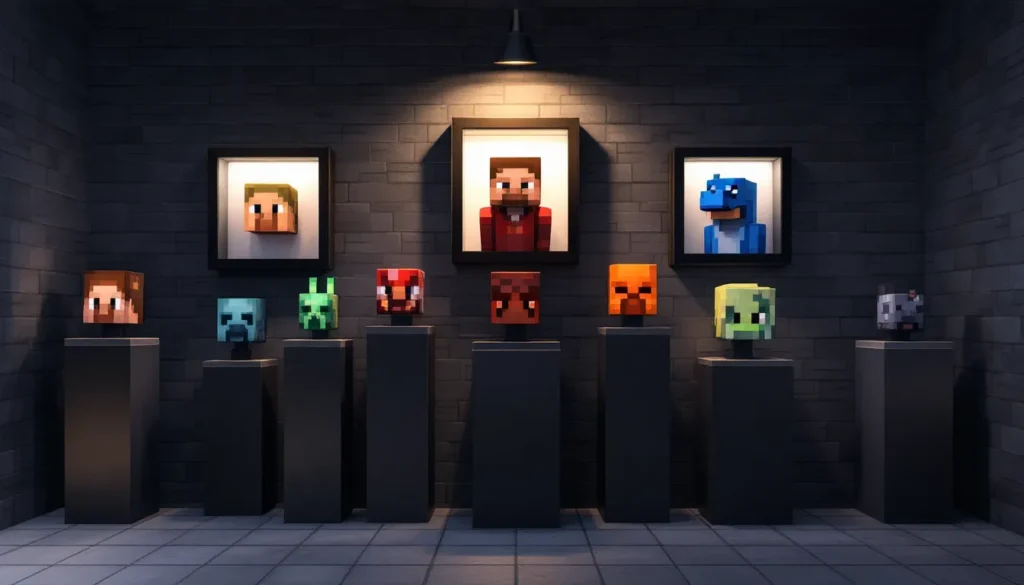
Minecraft heads have evolved from a quirky Easter egg into one of the game’s most versatile and visually striking decorative elements. Whether you’re running a vanilla survival world, a modded server, or a creative realm, understanding how to obtain, customize, and display heads opens up entire new possibilities for your builds. From trophy walls celebrating fallen enemies to intricate redstone contraptions, heads serve as both functional items and artistic centerpieces. This guide covers everything you need to know about collecting, creating, and showcasing Minecraft heads across Java Edition, Bedrock Edition, and beyond in 2026.
Key Takeaways
- Minecraft heads have evolved from Easter eggs into versatile decorative and functional elements that serve as trophies, art, and redstone contraptions across vanilla and modded servers.
- Player heads drop at a 100% rate on death in vanilla Java Edition, while rare mob heads like dragon and wither skeleton heads require specific conditions and grinding to obtain.
- Custom Minecraft heads can be quickly generated using online tools like Minetools.eu with base64-encoded texture data, eliminating the need for manual texture editing or farm grinding.
- Advanced head displays using armor stands and display entities allow for 360-degree rotation and animation, enabling interactive redstone-powered sculptures and dynamic galleries.
- Java Edition provides superior head customization through unrestricted commands, mods, and plugins compared to Bedrock Edition’s more limited NBT and add-on functionality.
- A well-designed head gallery combines strategic lighting, contrasting frames, logical organization, and scaled pedestals to transform collections into memorable server landmarks that tell a story of achievement.
What Are Minecraft Heads?
Minecraft heads are block items that display the face or likeness of players, mobs, and other entities when placed in the world. They’re essentially one-block sculptures that can be oriented in different directions, making them compact decorative pieces. Unlike full-body models, heads capture detail in a small footprint, perfect for builds where space is limited or where you want visual impact without bulk.
Heads have been part of Minecraft since early versions, but their functionality has expanded dramatically over the years. In vanilla survival mode, player heads drop naturally when players die, making them trophies of conquest or loss. Mob heads (like creeper, zombie, and dragon heads) require specific conditions to drop and are far rarer. What makes heads especially valuable is their compatibility with redstone circuitry and armor stands, they’re not just decorative, they’re functional game elements that can be rotated, animated, and integrated into builds in creative ways.
The aesthetic appeal of heads shouldn’t be understated either. A well-designed head gallery or trophy room tells a story: every head represents a moment, a player, or an achievement worth commemorating. This is why heads have become such a staple in multiplayer servers and competitive communities.
Types Of Minecraft Heads
Player Heads
Player heads are the most common and obtainable type. They drop when a player dies in Java Edition (with a 100% drop rate from natural deaths, configurable on servers). Each player head is unique, it displays the actual skin texture of the player it represents. This makes them highly valuable in multiplayer environments, especially on PvP servers or competitive realms where defeating other players is a core mechanic.
Player heads can also be summoned using commands with custom names or NBT data, allowing for creative displays of non-player characters or themed decorations. Many builders use command-generated player heads to create named NPCs or story elements in adventure maps.
Mob Heads
Mob heads are rarer and require specific conditions to obtain:
- Creeper Heads: Drop when a creeper is killed by a charged creeper explosion (0.5% chance).
- Skeleton Heads: Drop when a skeleton is killed by a charged creeper explosion (0.5% chance).
- Zombie Heads: Drop when a zombie is killed by a charged creeper explosion (0.5% chance).
- Wither Skeleton Heads: Drop naturally when killed in the Nether (0.5% chance), essential for crafting wither bosses.
- Dragon Head: Drops from the Ender Dragon when defeated. Only one per world per first kill, making it a trophy of major significance.
- Piglin Head: Drops from piglins when killed by charged creepers (0.5% chance).
The rarity of mob heads, especially the dragon head and wither skeleton heads, makes them prized possessions. They’re statement pieces that tell experienced players “this player has achieved something significant.”
Specialty Heads
Specialty heads include unique or event-based heads that don’t fit standard categories. These include:
- Command-generated heads with custom textures (using third-party tools and resource packs).
- Steve and Alex heads representing default player skins.
- Heads from mods or plugins that add entirely new head types.
- Event-exclusive heads from specific map challenges or server events.
Specialty heads are where creativity truly shines. Builders use them to create custom NPCs, decorative statues, or thematic displays that wouldn’t be possible with vanilla heads alone.
How To Obtain Minecraft Heads
Survival Mode Methods
Obtaining heads in pure survival mode depends on the type:
Player Heads: The simplest method is PvP, defeat other players and they drop their heads. On multiplayer servers, this is often the primary way newer players get their first head collection. If playing in single-player or a peaceful cooperative world, use a charged creeper explosion to kill mobs and trigger head drops. To create a charged creeper, place a lightning rod or let a creeper get struck by natural lightning during a thunderstorm.
Mob Heads: This is where grinding becomes necessary. For creeper, skeleton, and zombie heads, you’ll need a charged creeper farm. Set up an area where mobs spawn and can be lured into charged creeper explosions. Wither skeleton heads require a Nether farm, a dark room in the Nether where wither skeletons spawn naturally. With a charged creeper nearby, kill them until you get the drops you need.
Dragon Head: Defeat the Ender Dragon. It only drops on the first kill per world, so it’s a one-per-world item. Place it immediately in a secure location once obtained.
The grind for mob heads can take hours, especially for creeper and skeleton heads due to their low drop rates. Many players build automated farms using redstone and hoppers to speed up collection.
Creative Mode And Commands
Creative Mode eliminates all grinding. Simply open the creative inventory, search for “head,” and grab whatever you need. No conditions, no waiting.
For more advanced setups, commands offer unlimited flexibility:
/give @s player_head{SkullOwner:"PlayerName"}
This gives a specific player’s head to the nearest player. You can modify the SkullOwner value to get any player’s head, even if they’ve never visited your world.
For custom textures, the syntax is more complex:
/give @s player_head{SkullOwner:{Name:"CustomName",Id:[0,0,0,0],Properties:{textures:[{Value:"base64EncodedTextureData"}]}}}
This approach requires base64-encoded texture data from custom skin services. Tools like Minetools.eu or similar texture generators can provide the data needed. Commands give builders instant access to any head design imaginable without farm grinding, essential for creative projects on a timeline.
Creative Uses For Minecraft Heads
Building And Decoration
Heads are visual storytelling tools. A trophy wall lined with fallen enemies tells a narrative. A museum display celebrating completed challenges immortalizes achievement. Player heads arranged in patterns create murals or pixel art effects when viewed from a distance. The 3D nature of heads gives them depth that flat decorations can’t match.
When building with heads, consider these principles:
- Placement: Mount heads on walls, pillars, or pedestals depending on your aesthetic.
- Orientation: Heads face specific directions based on where they’re placed, use this to create directional flow or guide viewer attention.
- Contrast: Pale player skins pop against dark stone: darker skins stand out on light backgrounds. Use color theory.
- Scale: A single head feels lonely: clusters of 5+ heads create visual impact and draw the eye.
Redstone Contraptions
Heads aren’t just decorative, they’re functional. Placed on armor stands, they can be rotated, animated, and scripted using redstone mechanisms. This opens possibilities:
- Animated displays: Rotate heads in sequence using hoppers and redstone repeaters to create rotating sculptures or carousel effects.
- Triggered events: A pressure plate activates redstone circuitry that swaps out heads on armor stands, simulating a changing monument or time-based display.
- Puzzle mechanisms: Heads can be used as visual feedback for redstone systems, place specific heads to indicate circuit state or puzzle progress.
These setups require understanding redstone timing, repeater delays, and armor stand rotation commands, but the payoff is interactive, dynamic builds that respond to player input.
PvP And Multiplayer Displays
On PvP servers, heads become ranking systems. Kill counters displayed as head walls show dominance and create rivalry motivation. A “Hall of Shame” featuring players who’ve died most frequently is both humorous and competitive fuel.
Guilds and teams use heads to:
- Mark territory: Display guild member heads at the entrance of bases.
- Celebrate victories: Create memorial displays for conquered enemies.
- Track progression: Show member milestones with head collections.
Competitive servers often have leaderboards where top players are honored with dedicated head displays, creating tangible, visible status symbols beyond numerical ranks.
Creating Custom Minecraft Heads
Using Minecraft Head Generators
Custom head generators eliminate the need for manual texture editing. Websites like Minetools.eu, MinecraftSkins.net, and others allow you to:
- Upload or design custom skin textures.
- Generate base64-encoded head data.
- Copy the command to use in-game.
The workflow is straightforward: design a skin (or use an existing one), generate the data, paste the command into your chat, and the head appears instantly. This is the fastest method for getting custom heads without modding.
Some generators also offer pre-made heads from themes (animals, celebrities, objects, memes), allowing instant access to creative designs. This method works on both Java and Bedrock editions as long as commands are enabled.
Installing Custom Heads With Mods And Plugins
For deeper customization, modding and plugins unlock unlimited possibilities.
Java Edition Mods: Mods like Cosmetic Armor and ModelEngine allow server creators and single-player users to add custom head models, animate them, and assign them unique behaviors. Community modding sites like Nexus Mods host thousands of head mods and texture packs designed specifically for enhanced head visuals.
Server Plugins: Spigot plugins (such as HeadDatabase and Citizens) expand head functionality on multiplayer servers. HeadDatabase alone provides access to thousands of pre-made heads organized by category, eliminating the need to generate each one individually. Citizens allows server admins to create NPCs with custom heads, enabling storytelling and interactive elements.
Installation: Mods go in the mods folder (requires Forge or Fabric loader). Plugins go in the plugins folder on a Spigot/Paper server. After installation, restart the server and access the new head options through updated inventories or plugin commands.
The mod and plugin route requires more setup but offers unparalleled customization potential for serious builders and server administrators.
Advanced Head Customization And Display Techniques
Using Armor Stands And Display Entities
Armor stands are the foundation of advanced head displays. They’re invisible when set correctly and can hold heads at specific rotations and positions. A single armor stand holding a head can be rotated 360 degrees, inverted, or scaled to create unique visual effects.
Basic armor stand setup:
/summon armor_stand ~ ~ ~ {Small:1b,Invisible:1b,NoBasePlate:1b,DisabledSlots:4144959,Pose:{Head:[45f,45f,45f]}}
This creates a small, invisible armor stand with a rotated head. The Pose values control head rotation on three axes, adjust them to fine-tune exactly how the head faces.
Display entities (introduced in 1.19.4) are newer and more flexible. Unlike armor stands, display entities render without entity hitboxes and support advanced positioning:
/summon block_display ~ ~ ~ {block_state:{Name:"minecraft:player_head",Properties:{rotation:"8"}},Transformation:{left_rotation:[0f,0f,0f,1f],right_rotation:[0f,0f,0f,1f],translation:[0f,0f,0f],scale:[1f,1f,1f]}}
Display entities offer smoother animations and no collision problems. For large head galleries, display entities reduce lag compared to armor stands.
Animation techniques: Chain multiple armor stands or display entities with specific rotations and trigger them sequentially using redstone repeaters. This creates rotating, bouncing, or dancing head effects.
Building Head Galleries And Museums
A proper head gallery is architectural: it frames heads like artwork, uses lighting to highlight details, and organizes displays logically.
Design principles:
- Lighting: Place light sources (lanterns, glowstone) above or behind heads to eliminate shadows and showcase texture detail.
- Framing: Surround heads with contrasting blocks (frame them with dark wood against stone, for example) to make them pop.
- Organization: Categorize by type (players on one wall, mobs on another) or chronologically (oldest acquired heads first).
- Scale: Dedicate entire rooms to large collections. Don’t cram 100 heads into a 10×10 space, it dilutes impact.
- Pedestals: Elevate important heads (dragon, rare mobs) on pillars or decorated blocks to emphasize significance.
Builders on Game8 often showcase elaborate head galleries, inspiring others with design techniques and organizational systems worth studying. A truly impressive gallery takes weeks to build but becomes a server landmark.
Interactive galleries: Add pressure plates that trigger redstone systems lighting specific sections, or name-tag important displays so visitors understand what they’re seeing. This transforms a gallery from static decoration into an experience.
Minecraft Heads On Different Platforms
Java Edition
Java Edition offers the most flexibility for head customization. Commands are unrestricted, mods are abundant, and the modding community continuously develops new head utilities.
Specific features in Java Edition (as of 2026):
- Full command support with complex NBT data for custom textures.
- Armor stands and display entities both function perfectly.
- Mods like Cosmetic Armor add enhanced head rendering and animation.
- Server plugins like HeadDatabase provide pre-made head databases.
- LitematicaSchematica allows precise head placement using blueprints.
Java Edition is the de facto standard for serious head collectors and builders because of its tool ecosystem. If you’re building a competitive server or want maximum customization, Java is the platform.
Drop mechanics in Java Edition (as of 1.20.4):
- Player heads drop on death (100% vanilla rate).
- Mob heads drop from charged creeper explosions at 0.5% rate.
- Dragon head drops once per world.
Bedrock Edition
Bedrock Edition (Windows 10/11, consoles, mobile) operates differently. Commands exist but are more limited. Custom head textures using NBT data work but lack the granular control of Java.
Specific features in Bedrock Edition (as of 2026):
- Commands work on servers with cheats enabled, but custom texture NBT is more restricted.
- Player heads still drop on death but with server-dependent configurations.
- Mob heads drop identically to Java Edition.
- Armor stands exist and support similar positioning, though display entities have limited feature parity.
- Add-ons (Bedrock’s equivalent to mods) support custom heads but require more effort to carry out.
- Cross-platform play between Windows, Xbox, PlayStation, and Switch means head displays must render consistently across different hardware.
Bedrock’s head customization ceiling is lower than Java, but vanilla heads work identically. A basic trophy wall displays the same across both editions.
For competitive players using Twinfinite guides on Bedrock-specific mechanics, understand that advanced redstone and command systems may require workarounds compared to Java equivalents.
Conclusion
Minecraft heads represent far more than a decorative block, they’re a canvas for creativity, a trophy system, and a functional game element all at once. Whether you’re grinding charged creeper farms for rare drops, generating custom heads with online tools, or designing elaborate head galleries with redstone animation, the depth of possibilities grows every year.
As of 2026, both Java and Bedrock editions support sophisticated head displays, though Java Edition remains the platform for builders pushing customization limits. The gap between vanilla possibilities and modded/plugin-enhanced systems is vast, what starts as a simple wall of player heads can evolve into interactive museums, puzzle mechanics, or animated sculptures.
The key takeaway: don’t treat heads as throwaway items. Every head tells a story, represents progress, or contributes to a larger creative vision. Build your galleries thoughtfully, experiment with display techniques, and remember that the most impressive head collections aren’t the largest, they’re the ones that clearly reflect their builder’s vision and effort. Start small, iterate, and let your collection grow into something that amazes everyone who visits your world.
More Stories
Inside ThePlayCentre Minecraft Archives: A 2026 Guide To Maps, Builds, And Community History
Bane Of Arthropods In Minecraft: Master The Enchantment In 2026 (ThePlayCentre Guide)
Minecraft Adventure Tulip Purchase Review: Is ThePlayCEN.org Worth It In 2026?